Once you have successfully set FarmOps as your software provider on AIMs, you can move an animal using the app. Please see our FAQs on Activating AIMs and setting your AIMs pin for simple how to steps.
In this FAQ, you'll see how to:
- Move an animal out of your herd
- What to do if you get an error message
- Can you move an animal out of your herd if offline
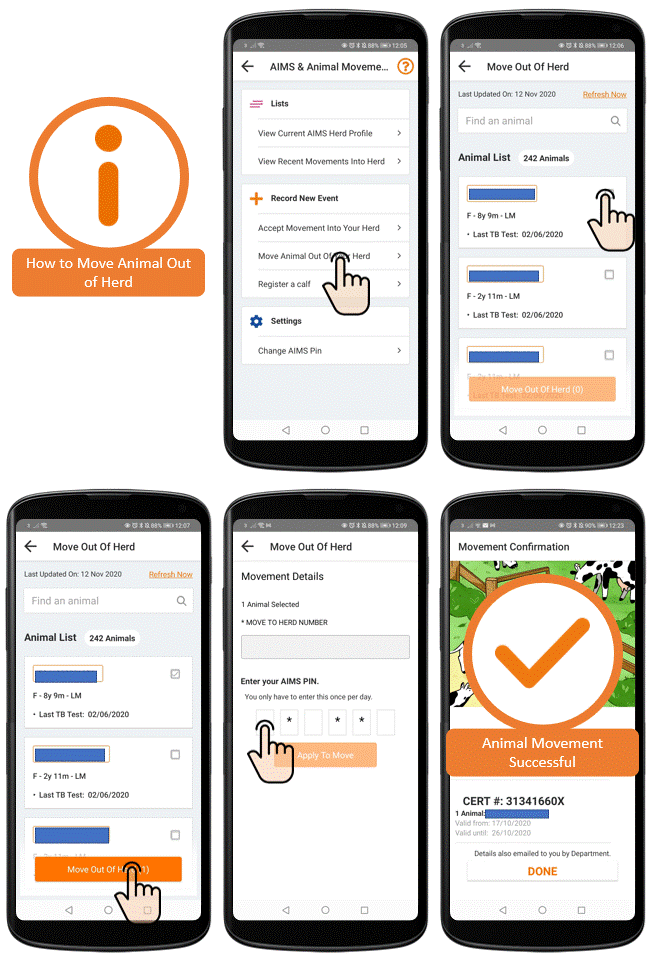
Move an animal out of your herd
This function is only available when your app is online.
- Go to Options
- Select AIMS & Animals Movements
- Under Record New event select Move Animal out of your herd
- From here you can select to apply for a movement certificate for up to 10 animals at a time.
- Select Move Out Of Herd when you have chosen the animals
- You can now enter the receivers Herd number
- Select Apply to move
If the application is successful you will be give a cert number. If the application is refused you will be shown an pop up with a reason for refusal.
What to do if you get an error message
While using FarmOps to move animals with the Department of Agriculture, if your movement wasn't successful, an error will pop up with a message. Check the error message as it will state the problem and how to fix it.
Once you have fixed the issue, you can try and submit the movement request again.
Can you move an animal out of your herd if offline?
No, you must be online to move an animal out of your herd.