In this FAQ, you'll learn how to:
How to use your expected calving list
To access your expected calving list:
- From the Task List, go to Options
- Select Calving and Calf Registration to go to the Calving page
- Tap View Expected Calving List
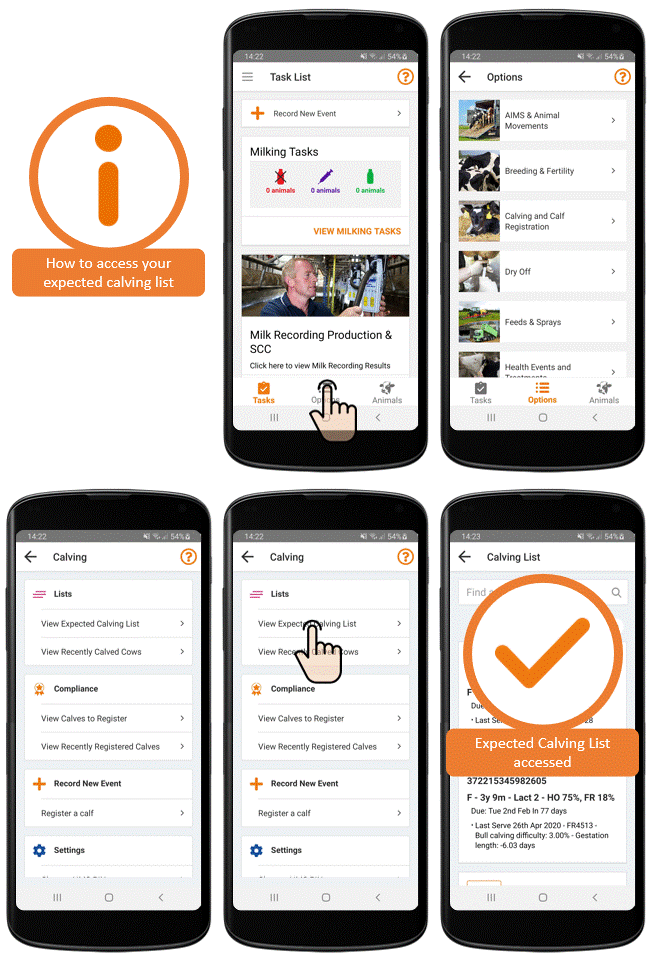
What is shown on your expected calving list:
- All your cows and heifers are shown in the list. For each animal, you can see:
- Jumbo & Full tag number
- Age, Lactation & top 2 breeds
- Expected calving date
- Last serve to the cow, if recorded
- Cows with a high SCC at dry off
- Cows in-calf to twins
- You can search for an animal easily using the search feature
- Your cows and heifers are sorted by pregnancy status, with due to calve, calved & no pregnancy diagnosis options presented.
- The pregnancy status and expected calving date of each animal is updated automatically as AI records, scans & calving dates are entered.
How to register a calf
View our full FAQ on how to register a calf here.
See your recently calved cows
To access your recently calved cows:
- From the Task List, go to Options
- Select Calving and Calf Registration to go to the Calving page
- Tap View Recently Calved Cows
What is shown on your Recently Calved Cows:
- All cows that have calved in the last 100 days on your farm are shown in the Recently Calved Cows list
- If you register a calving using FarmOps, the cow will automatically appear in this list.
- If you register your calves elsewhere, the cow will move into the Recently Calved Cows list, once the details of the calving are recorded in ICBF
- For each cow that has recently calved, you can see:
- Jumbo & Full tag number of the cow
- Age, Lactation & Top 2 Breeds
- Last calving date for the cow