Once you have successfully set FarmOps as your farm software provider on AIMs, you can register a calf using the app. Please see our FAQs on Activating AIMs and setting your AIMs PIN for simple how to steps.
In this FAQ, we'll show you how to:
- Register a calf with Department (AIMs)
- View calves to register & complete a calf registration
- Manage errors with your calf registration
- What to do if you forget your AIMS PIN
- View recently registered calves
Register a calf with Department (AIMS)
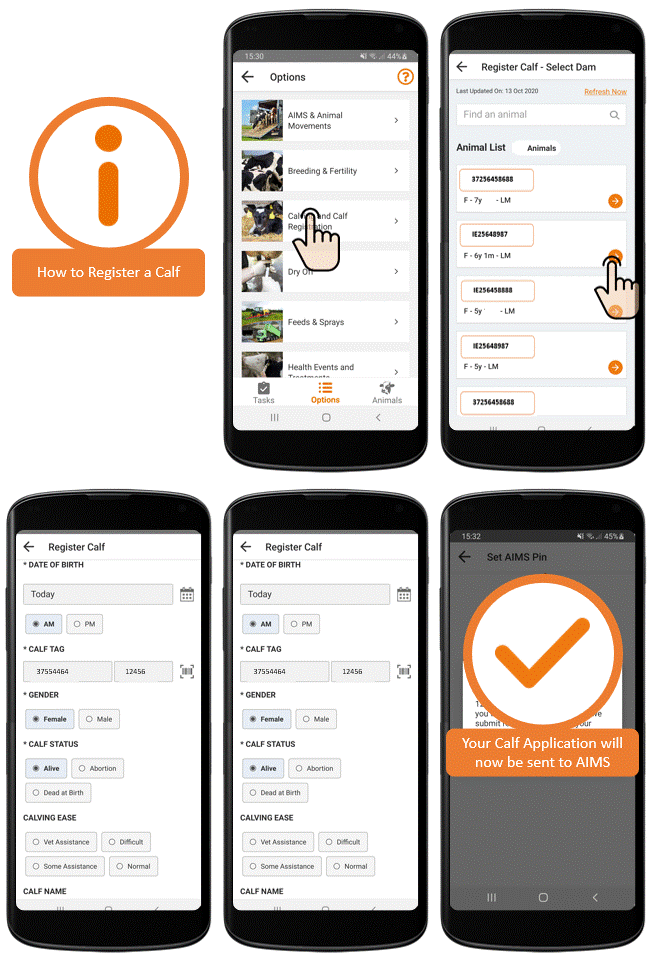
To register a calf:
- Go to Options
- Select Calving and Calf Registration
- Under Record New event choose Register a calf
- Select the Dam of the calf from the provided list
- From the Register Calf page you can enter:
- Dam details:
- Dam will be preselected for you
- Sire details:
- The Sire
- The Sire breed Recent AI serves will be shown along with an Add Sire option where you can find a list of your stock bulls and AI sires used in the herd. If you cant find a sire use the Add New function to add a new sire or create a unknown sire.
- Calf details:
- Date of Birth
- Time of day (this is to track any product withdrawals)
- Calf Tag
- Gender
- Calf name - For Pedigree registrations
- Select Show Additional Calf Fields in order to record more detail about the calf ie size & weight
- Dam details:
- You will now have the option to Register the calf or SAVE and Register Later
- If you are confidant that all details are entered correctly you can enter your AIMs pin and select Register Calf Now
- If the registration is successful you will be shown a confirmation screen
- If the registration is not successful; then you will be shown an Error - See our Manage errors with your calf registration
View calves to register & complete a calf registration
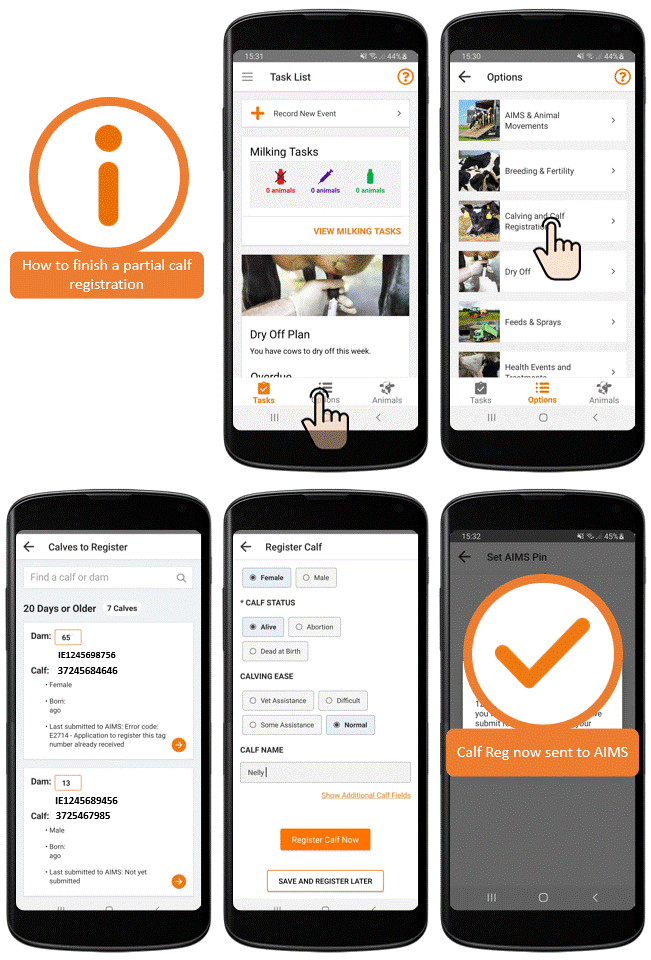
FarmOps allows you to enter a partial calf registration.
You can add key calving details in the calving pen in real time by using the Save and Register Later option.
Add details like Date - Sex of Calf - Calving Ease and Calf Vigor when its fresh in your mind.
To complete these registrations at a later date
- Go to Calving & Calf Registration
- View Calves to Register
- From here you can reopen partial calf registrations
- To complete this Registration you must at a minimum now add a sire Breed and a tag number
- Once you have filled out all sections select Register Calf Now
Calves to Register will appear as helpful reminders on your task list. Ensure you allow FarmOps notifications on your phone to receive helpful prompts to register calves but remember it is your responsibility to follow DAFM rules for Calf registering time lines so please manage your calf registrations carefully.
Manage errors with your calf registration
While using FarmOps to register a calf with the Department of Agriculture you may be shown an Error if your registration was not successful. Don't worry a quick reading of the Error and a bit of editing will have you on your way.
An example of regular errors:
- E2714 - Application to Register this tag number already received
- E2750G - Paternal Tag not a valid tag number
To register a calf following an Error open the Calves to Register section and you will be shown a detailed explanation of the Error under the heading Last submitted to AIMs. From here you can edit the registration and resubmit the application to DAFM once you have resolved the issue at hand.
What to do if you forget your AIMS PIN
If you have forgotten you AIMS PIN, don't worry we can reclaim it for you. You can contact us on 022 70800 Monday to Friday 9-5 or you can Leave us a message.
View recently registered calves
To view your recently registered calves:
- Go to Options
- Select Calving and Calf Registration
- Go to View Recently Registered Calves
- Search for a specific calf or scroll through the list
From here you will shown all of the calves you registered using FarmOps. Any calves registered else where will not be shown here.
Calves that were queried but are not yet accepted by DAFM will also be shown here. See AIMS response for the status of each calf.